


Hi everyone, and thank you to the admins for approving my membership. I aim to contribute with honesty, fairness, and a commitment to accuracy. I’m here to learn, discuss, and engage in good‑faith conversations with the community.
Welcome to Christian Forums, a Christian Forum that recognizes that all Christians are a work in progress.
You will need to register to be able to join in fellowship with Christians all over the world.
We hope to see you as a part of our community soon and God Bless!


Welcome Mathetria- how did you get the thingy over the e?Hi everyone, and thank you to the admins for approving my membership. I aim to contribute with honesty, fairness, and a commitment to accuracy. I’m here to learn, discuss, and engage in good‑faith conversations with the community.


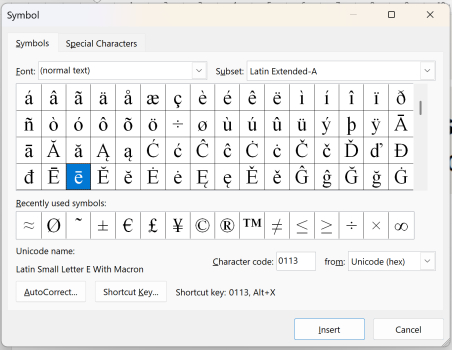
Welcome Mathetria- how did you get the thingy over the e?
Welcome Mathetria- how did you get the thingy over the e?
That didn't work for me. I did have fun finding these though ‼ M 6 ¢ Ä e ╞ V σ ü ô 9 A ╖ b ♫ ☼ / - J > " W O →Alt + 0275.
That didn't work for me.
Alt + 0275.
That didn't work for me. I did have fun finding these though ‼ M 6 ¢ Ä e ╞ V σ ü ô 9 A ╖ b ♫ ☼ / - J > " W O →
Alt 0275 or just ALT 275 does work in Microsoft Word if you have that package though.
@PS95, the letter ē is not included in the standard Microsoft Word package, but you can insert it using the Insert Symbol feature or by using keyboard shortcuts.
In post #5 above I had inserted the "insert" character function into that post which had been snipped from the word package.
"ē" can be generated in a Microsoft passage, but the software for this forum does not support it as an inserted "ALT 0275"
Copying "ē" from the word software does work with on this forum.


Hello, Mathetria, Welcome, How are you? We are well,Hi everyone, and thank you to the admins for approving my membership. I aim to contribute with honesty, fairness, and a commitment to accuracy. I’m here to learn, discuss, and engage in good‑faith conversations with the community.


